
Looking to upgrade from the iPhone 15 Pro Max to the iPhone 16 Pro Max? Here’s a detailed comparison of features and price.
Price
If you have the iPhone 15 Pro Max 256gb, which has an Apple trade-in value of $650, the net cost of upgrading to iPhone 16 Pro Max 256gb is $549.
Feature comparison
FeatureiPhone 16 Pro MaxiPhone 15 Pro MaxiPhone 14 Pro MaxDisplay Size6.9-inch Super Retina XDR OLED6.7-inch Super Retina XDR OLED6.7-inch Super Retina XDR OLEDResolution2868-by-1320-pixel resolution2796-by-1290-pixel resolution2796-by-1290-pixel resolutionChipA18 Pro chipA17 Pro chipA16 Bionic chipCamera System48MP Fusion, 48MP Ultra Wide, and Telephoto48MP Main, 12MP Ultra Wide, and Telephoto48MP Main, 12MP Ultra Wide, and TelephotoVideo Recording4K Dolby Vision at 24 fps, 25 fps, 30 fps, 60 fps, 100 fps (Fusion), 120 fps (Fusion)4K Dolby Vision at 24 fps, 25 fps, 30 fps, 60 fps4K Dolby Vision at 24 fps, 25 fps, 30 fps, 60 fpsMacro Photography48MP Macro PhotographyMP not specifiedMP not specifiedAnti-Reflective Lens CoatingYesNoNoBattery Life (Video Playback)Up to 33 hoursUp to 29 hoursUp to 29 hoursFast-Charge CapabilityUp to 50% charge in 35 minutesUp to 50% charge in 30 minutesUp to 50% charge in 30 minutesWeight7.99 ounces (227 grams)7.81 ounces (221 grams)8.47 ounces (240 grams)WirelessWi-Fi 7 (802.11be)Wi-Fi 6E (802.11ax)Wi-Fi 6 (802.11ax)MagSafe ChargingSupports up to 25WSupports up to 15WSupports up to 15WCamera Control ButtonYesNoNo
Camera Control Button
Perhaps Apple is doing itself a disservice by not listing the new camera control button on its own feature comparison page. Here’s what we know about this new button.
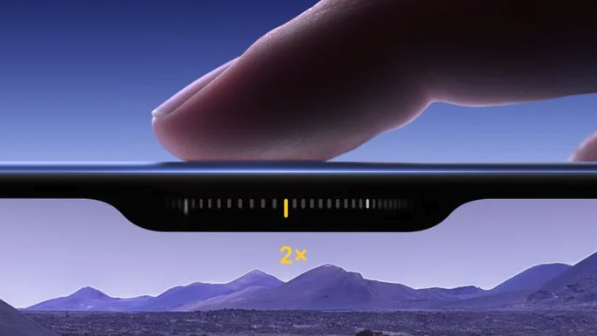
iphone 16 camera control button
This feature is underrated. Check out the current consensus on what this new button can do.
- Versatile functionality: The button combines a force sensor and touch sensor, allowing for multiple input types like clicks, presses, and swipes.
- Quick access: A single click opens the Camera app or takes a photo if the app is already open. Click and hold to start video recording instantly.
- Advanced controls: Light press opens controls like zoom, and can lock focus and exposure for reframing shots.
- Customizable settings: Users can adjust the double press speed and sensitivity of the button.
- Third-party app support: Developers can incorporate the button’s functionality into their apps, including social media platforms like Snapchat.
- Haptic feedback: The force sensor provides haptic feedback to mimic the feel of a DSLR camera shutter.
- Visual intelligence integration: Later updates will allow users to point the camera at objects and get information about them using the button.
- Physical design: Features a sapphire crystal covering with a smooth texture, surrounded by stainless steel trim, and is slightly inset into the frame.
- Landscape and portrait support: The button is designed to work effectively in both orientations.
- Multifunctional controls: Allows for adjusting zoom, exposure, depth of field, and cycling through stylistic options with various gestures.